
0 to 1 applications for concurrent mobile & projector use to support new product line launch and boost sales.


Epson
Projection Studio
Overview
LIVE PRODUCT LINKS
Mobile:
Projector:
LifeStudio line:
SUMMARY
ROLE
Product Design Lead
TIMELINE
~1 year
TOOLS USED
-
Figma
-
Adobe Photoshop
-
UserZoom
-
Adobe Illustrator
OKR #1
2.6x
APP DOWNLOADS
OKR #2
2x
PROJECTOR REGISTRATIONS
OKR #3
4.8x
ACTIVE USERS
CHALLENGES
BUSINESS CHALLENGES
❌ Unsure how to support the upcoming launch of Lifestudio projectors line
❌ Sales of existing projectors too low
USER CHALLENGES
❌ Not enough reasons to purchase a projector
❌ Brand’s not modern nor aesthetically pleasing
❌ Epson seen as a printer company & brand
SOLUTIONS
📱 Mobile and projector applications to support upcoming LifeStudio line launch
RESULTS
✅ Surpassed all OKRs
⭐️ Executive endorsement: The project received strong praise from senior leadership and became a reference point for all future Epson app initiatives.
🎨 Design transformation: Introduced a modern, socially driven design system now influencing other product lines
🚀 Brand impact: Helped shift internal perception of Epson from a utilitarian, printer company to one focused on user experience and emotional engagement
⏳ Long-term value: Current Epson stakeholders actively cite this project as an example of strategic innovation




The
Global Team
JAPAN
EUROPE
USA

7
stakeholders

4
leads & operations

5
design agency
members
Process
01
Discovery
OKR #1
APP DOWNLOADS PER HARDWARE SOLD
50%
OKR #2
SERIAL NUMBERS PER HARDWARE SOLD
15%
OKR #3
HOST PERFORMING AT LEAST ONE MAJOR ACTION PER TOTAL NUMBER OF HOSTS
5%
01.01 BUSINESS ALIGNMENT
I met with my fellow Senior Designer and the Project Manager to go over the project requirements, business leads, and existing user data to ideate the direction for the apps.
We conducted workshops to determine:
-
Audience
-
App direction
-
Personas
-
Users
-
User flows
01.02 AUDIENCE
We determined the audience by examining projector features:
-
Mid-cost projector: $600 - $1000 range
-
For home use: especially students & families
-
Seeking a memorable, high-end experience: sleek, modern experience
01.03 APP DIRECTION
To determine app direction, we asked ourselves:
What is the audience already doing that the projector (and app) can support them with?
We decided on a community-focused app in the social space, unlike anything seen before at Epson.


Community
Projector App
-
Social focus
-
Creates connection
-
Brings people together
APP'S TAGLINE:
Create the moment.
PURPOSE:
Create a show with family & friends -- and share it on the big screen.
02
Research
02.01 COMPETITIVE ANALYSIS
To understand the current market, what users were most familiar with, and how to best create the applications with useful features that bridge gaps for users in a delightful way, I conducted competitive analysis.
For this, I examined applications in the following industries:
Party & event planning
➡️ most direct competitors
Video editing
➡️ baseline for editing functionality
Social media
➡️ social experience users are familiar with
Entertainment/streaming
➡️ cinametic experience


02.02 DESIGN INSPIRATION
To find and maintain our true north throughout the app creation -- especially considering shifting business needs.
Finding design inspirations helped keep the team aligned on the style and feel for the apps, as well as decrease points of friction due to miscommunication (a picture is worth a thousand words, right?), wasted time and resources and increase efficiency.
I took a look at designs with a focus on:
Intuitive, easy to use
➡️ Bright, bold CTAs
High-tech, cinematic
➡️ High-contrast, dark UI
➡️ 3D-style & party imagery for templates
Fun, enjoyable
➡️ Gamified, rewarding
➡️ Highly interactive, immediately rewarding


03
Define


Super Host Mom
-
Hosts parties and events
-
Wants engaging activities to bring family & friends together
-
"Wow!" factor for her events
03.01 PERSONAS
With the apps' direction, the next step was to understand and create the personas:
We landed on 2 personas:
-
Super Host Mom
-
Creative Gen Z


Creative Gen Z
-
Enjoys spending time with friends
-
Seeks creative outlet
-
Tight budget
-
Active on social media
03.02 USERS
With the personas and apps direction in place, we determined the users:
Host
Owner of the projector
Full control of the show
Guest
Invited to show
Mobile app access
Attendee
Shows up at event
No mobile app usage
Can submit to show via projected
QR code
03.03 FEATURES
Key:
H = Host
G = Guest
A = Attendee
Before the show
-
H: Create show for event
-
G: Countdown for show
-
H: Send & manage invites
-
G: View guest list
-
H & G: Contribute & edit media to show
During the show
-
H & G: Join the live show:
-
React with emojis
-
Send comments
-
Remote-joining option
-
-
A: QR code to join show
-
A: Submit individual media
-
All: Submit Quick Pics (live media)
-
H: Remote control from mobile app
After the show
-
H & G: Auto-generated highlight reel of key moments
-
algorithm selects most-interacted-with media
-
-
H & G: Share highlight reel
-
H & G: Access reel thereafter
03.04 USER FLOWS
Throughout the design process, we made and reviewed 5 iterations of the user flows, including internal reviews to update the flows as we improved the features.


04
Ongoing Research
04.01 FEATURES TESTING
To validate and prioritize the most important features, I conducted Features testing via UserZoom surveys:
-
100 testers, screened to fit within the personas
-
Multiple choice, order ranking, & open-ended questions
-
Limited amount of questions to reduce cognitive fatigue


04.02 INTERNAL UI TESTING
Throughout the apps’ creations, we tested many design options to arrive at the optimal UI for the applications. This was an ongoing and iterative process.


05
Design
05.01 DESIGN ITERATIONS
Throughout the creation process of the apps, there were several iterations of the UI direction.
Use the slider below to see the before and after.
Before (V1)
The initial designs were light, pastel-colored, lacking a cinematic experience that was reflective of a projector.
After (V6)
Final designs were more cinematic and human-connection focused, implementing both brand and LifeStudio projector line colors.
Here's a breakdown of each iteration:
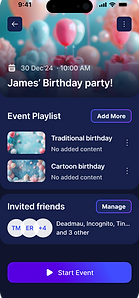
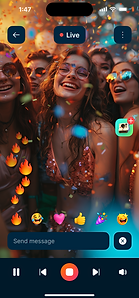
Version 1
➡️ Light, pastel-colored design
❌ Too calm/Not engaging enough
❌ Too cartoon-like
❌ Not catered for US market
Mobile


Projectors






05.02 LOGO
I created several iterations of the app logo until reaching the final result. The focus was on creating something that was comparable to existing app logos users were already familiar with:
⚙️ Functional
-
Showcasing projector in use
🎨 Well-Designed
-
Modern, bold, and colorful
DESIGN ITERATIONS


FINAL DESIGNS
Below are the final designs for both mobile and projector applications:


06
Prototypes
MOBILE
OUTLIER ITERATIONS
(not host, guest, nor attendee)
For user that has just downloaded the app - does not own a projector (host), hasn’t received an invitation (guest), nor has downloaded app during live event (attendee).
1
MOBILE & PROJECTOR
HOST
Pair Phone & Projector | Sample
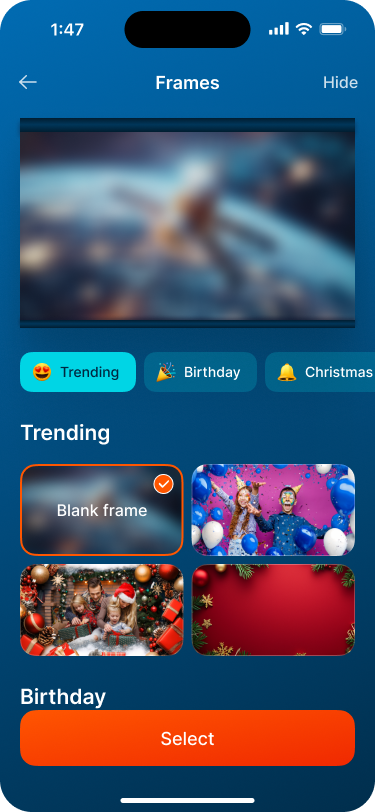
Pairing: After purchasing a LifeStudio projector, user can download the Epson Projection Studio app and pair to their phone to use the applications.
Sample: Host can also view video sample to see what they can do with the app.
prototype video layout:
PROJECTOR
HOST
2
MOBILE
HOST
Create Show & Invite Guest
Once host has paired their phone to their projector, they can create a show and share with guests to contribute.
3
MOBILE
GUEST
Accepts Invite & Adds Media
Guest can accept the invitation, join the show, and contribute their media.
4
MOBILE & PROJECTOR
LIVE EVENT
Host & Guest
During the event, host starts the show; guests can also join. Users can react with emojis, send comments, and Quick Pics to the projector to share with everyone.
prototype video layout:
PROJECTOR
GUEST
HOST
5
MOBILE
ATTENDEE
Join Show & Submit Media
Although attendees haven’t downloaded the mobile app, they can still join the fun via scanning QR code and upload media.
6
MOBILE
HIGHLIGHT REEL
View & Share Reel
After the show is completed, users can view and share an automatically-created reel from highlights from the show. Based on the media with the most reactions and interactions.
06.02 USABILITY TESTING
Prototype testing that consisted of:
-
1-on-1 moderated interviews
-
9 users, fitting either Host Mom or Creative Gen Z persona
-
1-2 hrs per interview
-
3 cameras streamed live on Zoom, observed by project team:
-
Camera 1: captured phone screen
-
Camera 2: captured respondent’s reaction
-
Camera 3: captured projected screen
-
-
Testers used Project Manager’s phone loaded with the app
-
Audio & video recorded


07
Launch
07.01 LAUNCH
After one year of working on the project, we successfully launched both the applications.
07.02 LINKS
Below are the links for the mobile and projector applications, as well as the LifeStudio projectors line:


08
Results
08.01 OKR RESULTS
OKR #1 | APP DOWNLOADS
GOAL OKR
50%
DOWNLOADS PER PROJECTOR SOLD
IMPACT
132%
EXCEEDED BY
2.6x
OKR #2 | PROJECTOR REGISTRATION
GOAL OKR
15%
SERIAL NUMBER PER PROJECTOR SOLD
IMPACT
30%
EXCEEDED BY
2x
OKR #3 | ACTIVE USER
GOAL OKR
5%
MAJOR ACTIONS BY HOST PER ALL HOSTS
IMPACT
24%
EXCEEDED BY
4.8x
08.02 INDUSTRY RECOGNITION

Epson Lifestudio Flex Plus Powerful streaming, anywhere
“Epson’s Flex Plus isn’t your dad’s slide projector....the Epson Projection Studio companion app lets multiple people project photos and videos in real time.”
--TIME Dec 12, 2025 issue of TIME Magazine


Home Projector EF-72, EF-71, EF-52, EF-51 (LifeStudio line)
“...A new smart projector that breaks away from the conventional product image and goes beyond its role as a ‘projection tool’ to improve quality of life and enable a lifestyle that suits the user.... It was highly praised as a company that takes on the challenge of presenting new possibilities for smart projectors.”
--2025 Good Design Award
08.03 REFLECTION
Despite the successful results, there are some things that I'd do differently:
RESEARCH
Further initial research on user interest to validate the direction of the applications.
Gather more data throughout the design process to persuade stakeholders towards user preferences.
WORKSHOPS
Run more structured and planned workshops for improved ideation, decisions, features, etc., in a more aligned manner as a team.
ORGANIZATION
I’d implement a well-structured schedule that'd account for the iterative process, further research, and workshops for timely design decisions and improved business alignment.
